This guide explains what AI root cause analysis is, how it works step by step, and how accurate it really is, using published research rather than marketing claims. You’ll also see the best tools on the market and how to choose one.
Table of Contents
What Is a Root Cause Analysis?
Root cause analysis (RCA) is a method for finding the deepest reason a problem happened, so you can fix it for good instead of just treating the symptoms.
Think of a weed. Cutting the leaves makes the yard look tidy for a week. Pulling the root stops it from coming back. RCA is the habit of pulling roots.
A simple example: A website crashes every Monday morning. Restarting the server fixes it, but only until the next Monday. A proper RCA finds the real cause: a weekly report job that eats all the memory. Reschedule the job, and the crashes stop.
Classic Root Cause Analysis Methods
- 5 Whys – ask “why?” again and again until you reach the real cause
- Fishbone (Ishikawa) diagram – sort possible causes into groups such as people, process, tools, and environment
- Fault tree analysis – map how small failures combine to cause a bigger one
- Pareto analysis – find the few causes behind most of your problems
- Change analysis – compare what changed just before the problem started
These methods still work well. They’re just slow when you have thousands of servers and millions of log lines. That’s where AI comes in.
What Is AI Root Cause Analysis?
AI root cause analysis uses machine learning and other AI methods to find the source of a problem automatically. It scans huge amounts of data, connects related signals, and points to the most likely cause, often with a suggested fix.
Teams use AI for root cause analysis in several fields:
- IT operations and SRE: finding why an app, server, or cloud service failed.
- Manufacturing: tracing defects back to a machine setting, material batch, or shift.
- Software testing: explaining why a test failed and whether it’s a real bug or a flaky test.
- Customer experience: spotting why users abandon a page or a checkout flow.
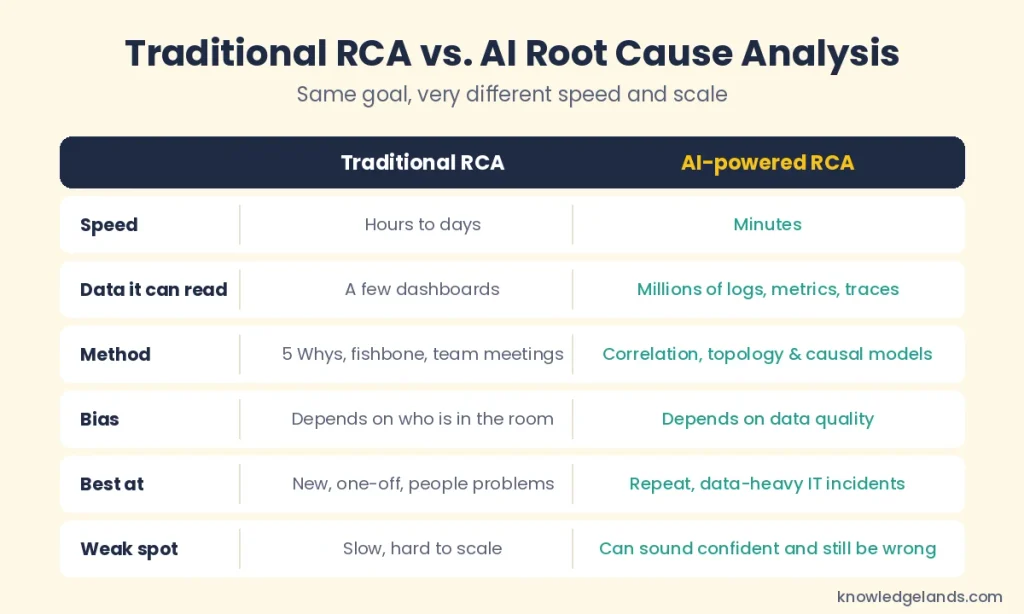
AI doesn’t replace the thinking behind RCA. It speeds up the slowest part, which is collecting and connecting evidence.
How Does AI-Powered Root Cause Analysis Work?
Most AI RCA tools follow the same five basic steps, even if each vendor brands them differently.
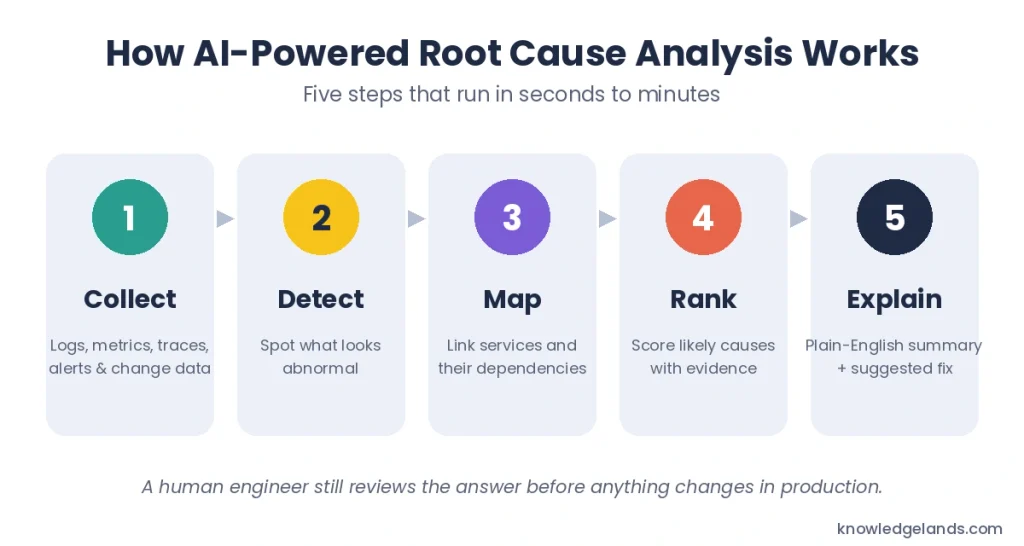
- Collect data. The tool pulls in logs, metrics, traces, alerts, and change records such as code deployments and configuration updates.
- Detect anomalies. Machine learning learns what “normal” looks like for each system. It then flags anything that drifts away from that baseline.
- Map dependencies. The tool builds a live map of how services, databases, and servers connect. This shows which failure could have caused which symptom.
- Rank likely causes. It scores each suspect using timing, dependencies, and past incidents, then puts the strongest candidate at the top.
- Explain and suggest a fix. Newer tools use generative AI to write a plain-English summary and recommend next steps, such as rolling back a deployment.
The Three Types of AI Behind RCA Tools
- Correlation and anomaly detection – finds events that happen together. It’s fast, but correlation alone can blame the wrong component.
- Causal AI – uses a dependency map to work out cause and effect, not just timing. It’s more precise but needs good topology data.
- Generative AI agents – use large language models to form ideas, query data, test them, and explain results in plain language.
The best tools now combine all three. Causal models narrow down the suspects, and AI agents explain the findings to humans.
Benefits of Using AI for Root Cause Analysis
- Faster fixes: teams find causes in minutes instead of hours, which cuts mean time to resolution (MTTR).
- Less alert noise: AI groups dozens of related alerts into one incident with one likely cause.
- Fewer repeat incidents: fixing the real cause stops the same problem from coming back.
- Help for junior engineers: plain-language summaries let newer team members handle issues that once needed a senior expert.
- Earlier warnings: some tools spot risky patterns and warn you before an outage happens.
How Accurate Is AI Root Cause Analysis?
This is the question vendors rarely answer clearly. The honest answer: it depends a lot on the tool, your data, and how hard the problem is.
What the Research Shows
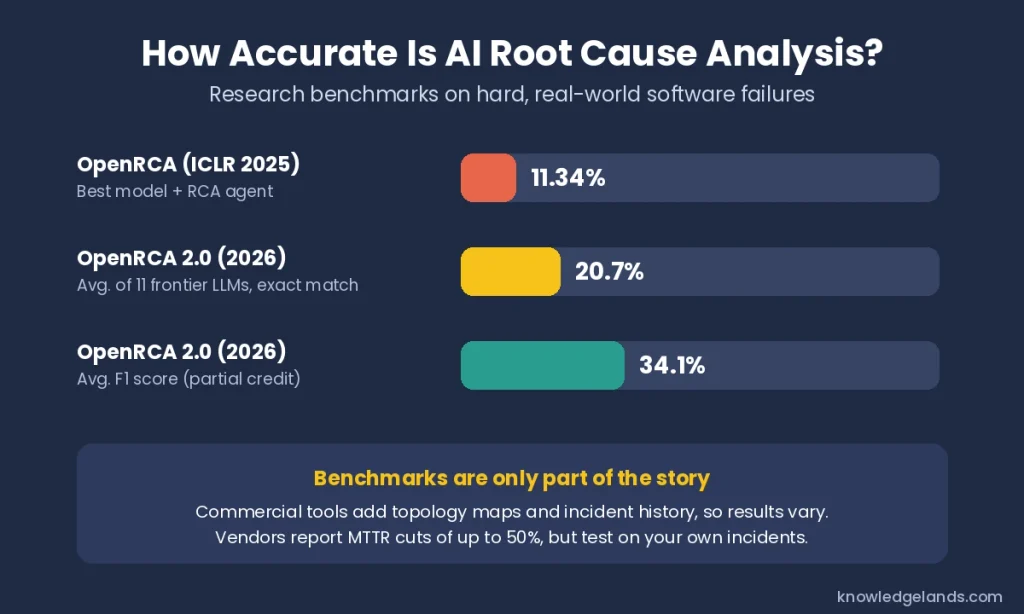
- OpenRCA (2025): Researchers from Microsoft and partner universities tested large language models on 335 real failures from three enterprise systems, with over 68 GB of telemetry data. Even with a purpose-built agent, the best model solved only 11.34% of cases. You can read the full OpenRCA research paper for details.
- OpenRCA 2.0 (2026): A tougher follow-up tested 11 frontier models. On average, they found the exact set of root causes in only 20.7% of cases.
- Right answer, wrong reasons: The same researchers found that models often guess the correct cause through faulty reasoning. That makes a correct answer hard to trust on its own.
What Vendors Report
Commercial tools don’t rely on a raw language model alone. They add live dependency maps, change history, and years of past incidents. For example, BigPanda says its RCA can cut MTTR by up to 50%, and one of its customers reported a 78% drop, from 25 hours to 5.5 hours per incident.
Keep in mind that these are vendor-reported results from their best customers. Your results will depend on your own setup.
What Makes AI RCA More Accurate
- Clean, complete data: missing logs or traces leave blind spots.
- A live dependency map: the tool must know what connects to what.
- Change tracking: many incidents start with a deployment or configuration change.
- Honest “I don’t know” answers: good tools say when the evidence is weak. Datadog’s Bits AI SRE documentation notes that its agent marks an investigation inconclusive when the data can’t support a clear answer.
Tip: Before you buy, replay 20 to 30 past incidents where you already know the cause. Count how often the tool’s first suggestion is right and how often the right answer appears in its top three.
Limitations and Risks of AI Root Cause Analysis
- Confident mistakes: AI can present a wrong cause in very convincing language.
- Correlation traps: two things that happen at the same time aren’t always cause and effect.
- Poor data, poor results: gaps in monitoring lead straight to gaps in answers.
- New problems: AI learns from patterns, so brand-new failure types are harder for it to spot.
- Over-automation: letting AI change production systems without human review can turn a small issue into a big one.
The safest approach is “AI investigates, human decides.” Let the tool gather evidence and suggest a cause, then have an engineer confirm it before acting.
AI Root Cause Analysis for SAP: Avantra
Some systems need a specialist. SAP landscapes are a good example. They often include dozens of connected systems, hundreds of metrics, and many outside integrations, which makes general-purpose tools struggle.
Avantra’s AI root cause analysis is built specifically for SAP operations. Here’s what it does:
- Learns your environment automatically: it builds an understanding of normal behavior and of how each SAP system depends on others.
- Uses an SAP-trained AI model: its AI draws on years of SAP operations expertise, so it understands SAP-specific failures.
- Suggests a “Next Best Action”: it turns complex findings into readable action plans that tell your team what to do next.
- Cuts alert fatigue: it filters out false alarms while still catching the critical ones.
- Prevents issues early: it flags risks before they turn into outages and can trigger automated fixes.
Avantra reports more than 1,600 customers and over 25 years in SAP operations. It’s a strong fit if SAP is the heart of your business.
Top 3 Alternative AI Root Cause Analysis Tools
If you need AI root cause analysis beyond SAP, these three platforms do similar work across wider IT environments.
1. Dynatrace (Davis AI)
Dynatrace has used AI for operations for over a decade. Its Davis AI engine follows a real-time map of your whole system, called Smartscape, to find the cause of a problem through cause-and-effect reasoning rather than simple correlation.
- Best for: large enterprises with complex, hybrid environments.
- Standout feature: deterministic causal AI combined with plain-language problem summaries and remediation steps.
- Watch out for: it’s a full platform, so you get the most value when you run your monitoring on Dynatrace.
2. Datadog (Watchdog and Bits AI SRE)
Datadog offers two layers of AI. Watchdog runs built-in anomaly detection and root cause analysis with no setup. Bits AI SRE is an AI agent that investigates alerts like an engineer would: it forms ideas, checks them against your data, and reports a likely cause.
- Best for: cloud-native and DevOps teams already using Datadog.
- Standout feature: investigations that start automatically when an alert fires and can be triggered from Slack.
- Watch out for: costs can add up as your data volume and feature use grow.
3. BigPanda
BigPanda focuses on IT operations teams. It pulls alerts from many monitoring tools into one place, groups related ones, and links them to recent changes that likely caused the incident.
- Best for: NOC and ITOps teams that use many different monitoring tools.
- Standout feature: change-based root cause detection with natural-language explanations and confidence levels.
- Watch out for: it relies on data from your other monitoring tools, so it works best on top of an existing setup.
Quick Comparison
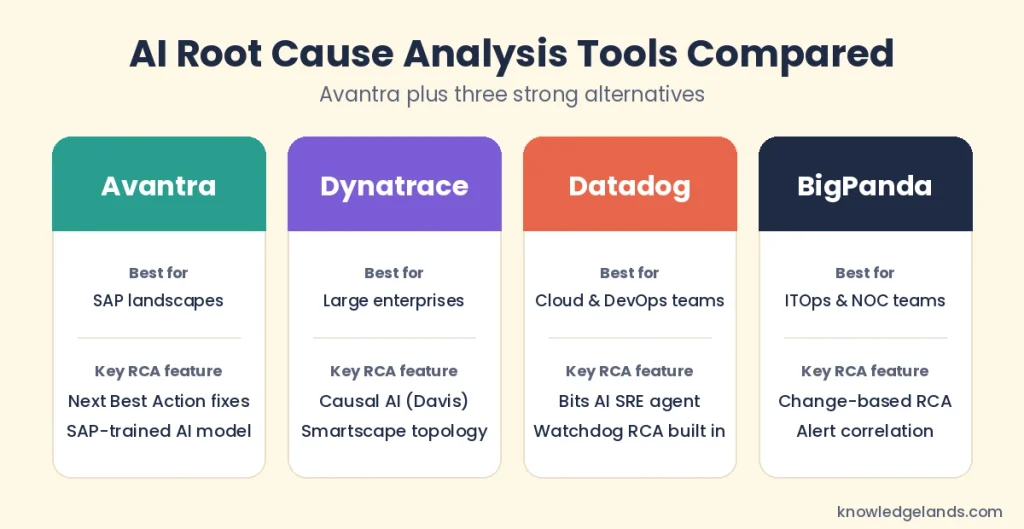
| Tool | Best for | How it finds the root cause |
| Avantra | SAP landscapes | SAP-trained AI model with Next Best Action suggestions |
| Dynatrace | Large, complex enterprises | Causal AI over a live topology map |
| Datadog | Cloud and DevOps teams | Watchdog RCA plus the Bits AI SRE agent |
| BigPanda | ITOps and NOC teams | Alert correlation linked to recent changes |
What Is the Best AI Tool for Root Cause Analysis?
There’s no single best tool for everyone. The right choice depends on what you run:
- Running SAP? Start with a specialist such as Avantra.
- Large, complex enterprise stack? Look at Dynatrace.
- Cloud-native team already on Datadog? Try Bits AI SRE first.
- Many monitoring tools and a busy NOC? BigPanda can tie them together.
For a wider view of how AI, cloud, and automation are changing enterprise IT, read our guide to Droven.io enterprise tech innovation.
How to Get Started With AI Root Cause Analysis
- Fix your data first. Make sure logs, metrics, and traces cover your key services.
- Track every change. Connect your deployment and configuration tools so the AI can see what changed.
- Start in “advisor” mode. Let AI suggest causes while humans make the final call.
- Measure results. Compare MTTR and repeat incidents before and after rollout.
- Automate slowly. Allow automatic fixes only for low-risk, well-understood problems.
Final Thoughts
AI root cause analysis turns hours of log digging into minutes of focused review. It shines on data-heavy, repeat problems, and it keeps getting better as causal models and AI agents improve.
Still, it isn’t magic. Research shows even top models miss most causes on tough, unfamiliar systems. Pick a tool that fits your stack, feed it clean data, and keep a human in the loop. Do that, and AI becomes the fastest investigator on your team. You’ll find more practical tech explainers in our Technology section.
FAQs About AI Root Cause Analysis
It’s a way to find the real reason a problem happened, not just the visible symptoms, so you can stop it from happening again.
It collects data such as logs and metrics, spots unusual behavior, maps how systems connect, ranks the most likely causes, and explains the result in plain language.
It varies widely. Research benchmarks on hard, unfamiliar systems show raw language models finding the exact cause only 11% to 21% of the time. Commercial tools add dependency maps and change data, which can improve results, but you should test them on your own past incidents.
No. AI speeds up evidence gathering and narrows the suspects, but engineers still need to confirm the cause and approve fixes.
No. Manufacturers, software testers, and customer experience teams also use it to trace defects, failed tests, and drop-offs back to their source.
Leave a Reply